
1. Introduction
Tournament management is a core operation for most golf facilities, and it is no exaggeration to characterize a Tournament Management System (TMS) as a "mission critical" technology platform. A reliable, fully featured, and high-performance TMS delivers major benefits to the golf operation. On the other hand, TMS failure or serious underperformance can trigger disruptions that have negative financial, reputational, or even legal consequences. It's no surprise that procuring and deploying a TMS is a major undertaking for a golf facility, where the purchase decision carries both substantial risks as well as the anticipated rewards.
This guide is one of two guides for use by private golf clubs, daily fee and municipal courses, resorts, indoor golf facilities and other golf operators. These guides are made available to prospective TMS customers ("Customers") with the goal of helping them understand costs, benefits and risks, evaluate options, and ultimately assist them in selecting the best partner.
The availability of this guide is particularly timely because the market for tournament management systems is strong, growing and has recently attracted several new entrants in addition to established suppliers such as Golf Genius and BlueGolf.
Please note this guide is focused mainly on software and customer support aspects of tournament management systems.
To support the evaluation process, we have published a companion TMS Evaluation Checklist — a structured spreadsheet listing every requirement covered in this guide, organized into functional categories with scoring columns for side-by-side vendor comparison. We recommend using the checklist alongside this guide during supplier demonstrations, asking each supplier to walk through the requirements and demonstrate their capabilities in real time.
How to Use This Guide
This guide is organized into 13 sections. Sections 1 and 2 set context by defining the full scope of a TMS and helping identify which requirements matter most for a golf facility. Sections 3 through 12 each address a functional area of a TMS (from tournament creation and handicapping to integrations, communication tools, and customer support). Section 13 presents aggregate usage statistics from Golf Genius Tournament Management (Golf Genius TM) to illustrate what clubs actually do with a TMS in practice.
A separate Supplier Evaluation Guide addresses non-product factors such as supplier financial health, customer references, service-level commitments, and contractual terms. Together, the two documents and the evaluation checklist provide a comprehensive framework for TMS procurement.
Not every feature matters equally to every facility. We recommend categorizing each requirement into one of three priority levels:
- Must HaveA deal-breaker if missing. Without this capability, the TMS cannot support your core operations. Examples could be half shots in a member/guest or skins events with a subset of players.
- Should HaveA strong preference that meaningfully affects staff productivity or the golfer experience. Examples could be extending match play scoring beyond 18 holes to deal with ties after hole 18, or a stroke play qualifier that automatically seeds a bracket tournament for a club championship, or integration with a venue management system.
- Nice to HaveA bonus capability that adds value but is not essential for day-to-day operations. Examples could be multiple logos on cart signs for charity outings, or a very flexible spreadsheet upload capability.
2. Understanding Customer Requirements
Before diving into requirements, it's important to consider the types of customers that use a TMS. Broadly speaking, there are three types of customers:
Private Clubs
Private clubs use a TMS for member events, leagues, and outings, with unique requirements for member events.
The key member events are member/guest tournaments and club championships. These events are complex for reasons addressed later, and need to be flawlessly organized and executed. Golf professionals are always seeking a "wow factor" for these events.
Although private clubs do not think of themselves as managing leagues, they almost always run events such as Ladies 9-holers and 18-holers, Wednesday 9-and-dine, Saturday Men's Golf, etc. These are leagues in the sense that a group of golfers play over some number of rounds, keep track of season statistics, need communication tools, etc.
Many private clubs rent out their golf course, often on Mondays, for corporate and charity outings. Outing organizers have special needs in terms of payment processing, sponsor signage, mobile branding etc. For example, offering sponsors the opportunity to place logos on cart signs, scorecards, and leaderboards allows the club to maximize sponsor revenue.
Public Facilities
Public facilities do not have member events per se, but usually need to manage a large number of leagues and outings. Without a fit-for-purpose TMS, promoting, organizing and executing these events can place a large burden on the golf professional staff, which often is smaller in number than at private clubs. The benefits of a high performance TMS produce immediate efficiencies for the team. At the same time, the right TMS can deliver a premium golf experience for players. Over time, golfer satisfaction drives loyalty — and loyalty increases repeat business at your facility.
Public facilities often "specialize" in hosting outings, an important source of revenue. As noted above, a TMS that can help support a terrific golf experience can help a public facility command a top of the range price for hosting at their facility. It can also help you increase profitable league play without the typical administrative headaches.
Recreational Event Organizers
Recreational event organizers have the most limited needs and are generally the least concerned about data security, terms of service, and perhaps even accurate handicap calculations. They need the ability to create and manage leagues and other sorts of single round and multi-round events.
While this guide focuses primarily on the needs of private clubs and public facilities, recreational event organizers will find value in the sections on single-round events, automatic scheduling, and league management. If your needs are limited to organizing casual leagues and single-round outings among friends, pay particular attention to Sections 3, 5, and 7.
3. Event & Tournament Formats
The primary job of a TMS is to support a wide range of golf events, from a small single-round event held on one course to a multi-round, multi-day, multi-course event for hundreds of golfers. Events can be classified as either single round events or multi-round events (considering league play as a separate class). From our experience, about 75% of non-league events are single round events played on a single course. To successfully set-up and manage these popular events, a TMS should provide a very fast and efficient "quick setup" capability. Multi-round events such as round robin tournaments, brackets with qualifiers and Ryder Cups are more complex to set up. These events are what clearly reveal the capabilities of a particular TMS. Why? Because they are extremely time consuming and difficult to manage without the support of a powerful and comprehensive TMS. Multi-round events are inherently stressful for golf professionals and using a fully featured, proven TMS can make all the difference when it comes to achieving a successful and low stress outcome.
An important factor in evaluating a TMS is the variety of "tournaments" or "competitions" that can be created and managed. Golf Genius TM offers the broadest range of event formats in the industry, by far. Variety creates value by enhancing the playing experiences of golfers.
Single-Round Events
Most private clubs and public facilities offer a number of single round events on their golf calendar. For example, it is very common for a club to regularly hold individual or team events such as couples' events, a senior men's Stableford, an afternoon guest day, etc.
Another common example of a single round event is a charity or corporate outing held at a golf facility. As with single round member events, the tournament setup and scoring are very straightforward. An advanced TMS will ensure heightened value for sponsors by providing branding and messaging "real estate" on scorecards, cart signs, mobile apps and TV leaderboards.
Since most single round events are played on one course, a TMS should provide a very fast way to create these sorts of events. Golf Genius TM includes a streamlined process to handle these events called Quick Event Setup. This set-up is accomplished in just four simple steps as shown in the graphic below:
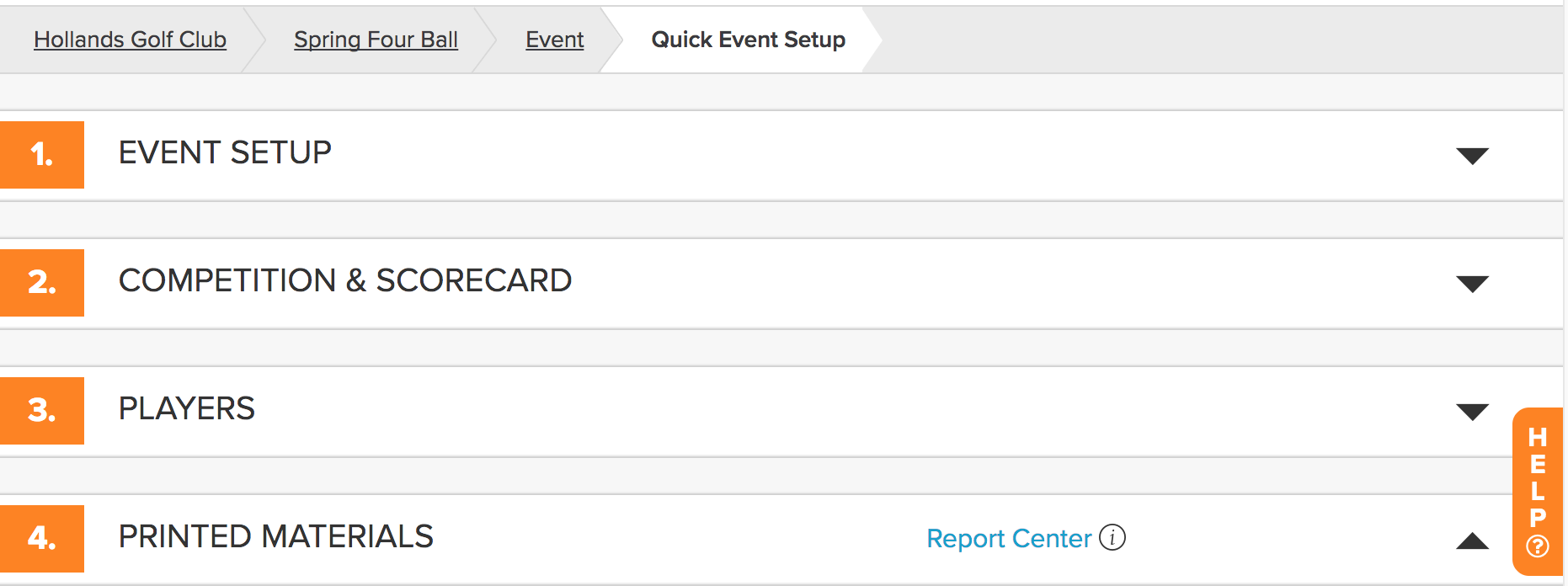
Players can be sourced from the club's Master Roster, from the club's GHIN roster, from the entire GHIN database, or uploaded from a spreadsheet. Players can be moved onto the tee sheet and moved around via a drag and drop interface. Quick Event Setup is designed for one tournament format plus optional skins. The entire library of printed materials is available for Quick Event Setup, and the most common reports to be printed are tee sheets, alpha lists, scorecards and cart signs. The Scorecard Composer can be used to control every element of the scorecard, or the customer can select from a very wide range of existing scorecards. At any point, the customer can exit Quick Event Setup and continue with all of the powerful features of Golf Genius TM. Over 60% of the non-league events managed in Golf Genius TM start as a Quick Event.
Even in a single round event, you may want to hold a tournament such as best 2 balls of foursome, but also have low gross and low net competitions, and perhaps an optional skins pool. For a charity outing, where the organizer wants to "spread the glory" and have as many prizes as possible, the organizer may choose to have multiple divisions such as men, senior men, and women, and for each division have multiple tournaments. In charity outings it is very common that some players will have official handicaps and some will not. To deal with this fairly, some organizers place golfers with handicaps in one division and players without handicaps in a different division. The first division calculates playing handicaps, and the second division uses Callaway or Peoria handicapping. With Golf Genius TM, the customer can create as many tournaments in a particular event as desired. There can also be multiple tournaments in a round. Setting up and scoring these tournaments is simple and fast.
Split-Format Events (9/9, 6/6/6, 3/3/3)
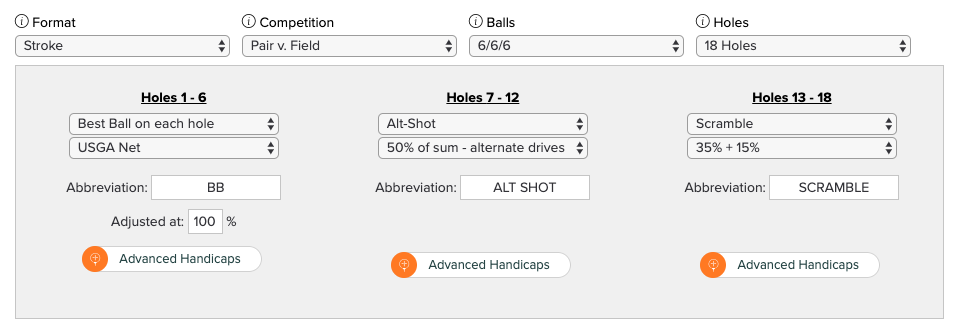
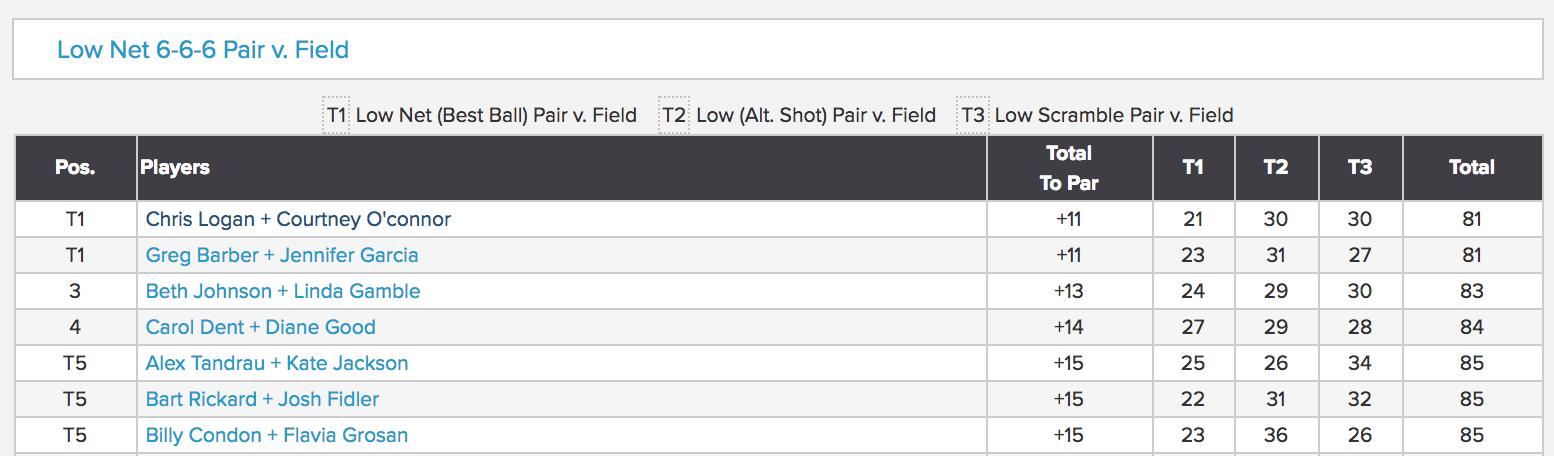
To make single round events even more interesting and fun for participants, tournament managers may wish to design formats that necessitate more complicated scoring requirements. A good example is 9/9, 6/6/6, or 3/3/3 events, meaning that there is a different format for each 9, 6, or 3 holes. An example of a 6/6/6 two-person team event might be best ball of partners for the first six holes, a two-person scramble for the next six holes, and either both balls or alternate shot for the last six holes. The results of the three formats are then added for a total 18-hole score. Because there are different formats, the handicaps must be calculated separately for each 6-hole format and there are a number of rounding issues to be considered. Additionally, handicap strokes can be applied in different ways (depending on the club's preference). These sorts of events must be handled accurately on scorecards and leaderboards, and they must be easy to set up. Proper handling of 9/9, 6/6/6 or 3/3/3 events is a good example of where "the devil is in the details," particularly with respect to handicapping and printed materials.
Wheels
Another potentially complicated format for single round events is "wheels." Consider the case where a host invites three guests and the competition is a best ball of partners tournament. In a wheels setup, the host competes in three separate competitions. The player is scored with guest 1 in a best ball tournament, but she is also scored with guest 2 and again with guest 3. This one foursome is scored as if playing in three different tournaments. The more general wheels event is one in which all combinations of two players from the foursome are scored in a better ball of partners: players 1 and 2, 1 and 3, 1 and 4, 2 and 3, 2 and 4, and players 3 and 4.
Optional Skins
Many single round events include an "optional skins pot" whereby golfers decide before teeing off if they want to participate. This seems straightforward, but to support it a TMS must have some form of divisions or groups so that only the golfers participating can be identified.
Single round events come in all shapes and sizes and provide huge enjoyment for recreational golfers of every ability. To properly set up and manage these events, golf professionals require a versatile and time-saving tool that they can count on every day.
Multi-Round Events
Round Robin (Member-Guest Invitationals)
Round Robin events such as club member-guest invitationals are very common. A typical member-guest event divides two-person teams (member and guest) into flights of six teams. The flights are typically based on team index or team Playing Handicap. Each team in a flight plays the other five teams over five 9-hole matches. Points are won or lost in each match based on varying criteria chosen by a club. For instance, points may be awarded for each hole and/or match won (oftentimes with maximums applied). At the end of five matches, the teams are ranked in each flight. There is often a playoff match among the flight winners, usually over a specified set of holes until there is one overall winner. For details, see Member Guest guide.
One common challenge in managing round robin events is the unavoidable need for changes right up to the last minute due to guest cancellations or substitutions, handicap adjustments, etc. This volatility demands that the tournament manager "reflight" the event to reflect these ongoing revisions. Therefore, an important requirement for any TMS is to allow for easy reflighting without losing the details of course, tee, and starting hole for each team in each flight in each round.
Most member-guest invitational events use the concept of half shots to balance handicaps in 9-hole matches. A player with an even Playing Handicap will get the same number of strokes on front and back of an 18 hole course, and hence the same number of strokes in each match. However, a player with an odd Playing Handicap will get "n" strokes on one side and "n+1" on the other side. Since most courses stroke the front 9 with handicap holes 1, 3, 5, etc. A player with an odd Playing Handicap who is playing the front 9 three times will have an advantage over a player with an even playing handicap. To deal with this anomaly, most events use half shots. A player with a Playing Handicap of 7 will receive 3½ strokes on each side — a stroke on the lowest three Stroke Index holes and a half stroke on the fourth. A half stroke means that a player wins the hole in the event of a tie. These half strokes also need to be noted properly on the scorecard and reflected in live scoring on the mobile app.
An additional popular format in these events is aggregate skins. After the first two rounds, each team will have played a 9-hole match on the front 9 and the back 9. Clubs often wish to score a skins game for each flight or perhaps the entire field based on the full 18-holes for each team. Aggregate skins are typically scored for four of the five matches (e.g., two rounds on Friday, and the first two of three rounds on Saturday, resulting in two aggregate skins tournaments).
Other challenges with round robin events include automatically creating a round robin schedule for each flight, providing printed materials such as a tee sheet that shows the flight makeup and all of the matches for that flight, and printed cards for each team that displays all five matches and who their opponents are in each match. There may be cases where a flight only has five teams instead of six. In this case, in each of the five rounds, one team will have no opponent. These teams without opponents are normally scored against par.
Tee Gifts are very popular for member-guest events, and pose another logistical challenge for the professional staff. This process traditionally requires manually collecting sizes, tracking selections, and handling extra back-and-forth communications before the event. With Golf Genius TM, you can easily create a custom order form, connect it to your event roster, and collect orders from your participants.
Multi-Round Same Format
Multi-round events with the same format in every round, such as a 54-hole low net championship, are very common. This sort of event is straightforward from a scoring standpoint, but there is a need for a well-organized set of printed materials to keep everything moving along. Most of the time in such events, the field is flighted, and there are usually additional tournaments within each round. For example, if the main event is a 54-hole tournament, low gross and low net competitions scored by flight each round might be added to the mix.
Multi-Round Different Formats
Multi-round events with different formats is a very popular team-based competition. The most common format for this sort of event is one round of best ball, one round of both balls and one round of alternate shot. The wrinkle is that in most cases the alternate shot round uses a team handicap rounded to 0.5, so as to minimize ties (take average of two Playing Handicaps and round to 0.5; a 6 and a 7 becomes team handicap of 6.5 — hence 6.5 strokes will be subtracted from the total score of the alt shot round).
Ryder Cup Events
Most golfers think of a "Ryder Cup" as two teams of the same size playing three rounds of golf — best ball of partners, alternate shot and singles. This may be the case for the true Ryder Cup managed by the PGA of America and The R&A, but recreational golfers often want a more general format. For recreational golfers, a Ryder Cup format is considered by Golf Genius as any number of teams playing any number of match play events — typically four ball matches, singles matches and alternate shot matches. Points are earned for each match and added together for a final ranking. It is not unusual to play a four ball match and two singles matches in the same round. A typical example might be: two teams of 8 (Team South and Team North) are playing a Ryder Cup style tournament over 3 Rounds. Each foursome in each round consists of two players from Team South and two players from Team North. Each match is worth a point. In Round 1, the teams play alternate shot Match Play (4 points available). In Round 2, they play Four-Ball (4 points available). In Round 3, they play singles matches (8 points available). Of the 16 total matches, Team South won 10 of them. Team North won 6. The total team score is Team South 10, Team North 6.
Golf Genius TM automatically creates the pairings for each round to minimize repeats using a proprietary mathematical programming system. Take the case of eight players in each of Team North and Team South. In three rounds, each player should have three different partners from their own team, and oppose six different players from the opposing team. While this pairing task can be accomplished manually, the manual approach is hugely time consuming and error prone. Furthermore, some Ryder Cup events are more than three rounds, which makes the manual pairings method even more burdensome to the point of being impractical.
Since Ryder Cup results are not final until the last match is played, it is common to also have additional tournaments in each round. For example, you might have a low gross and low net competition between the North and South teams in each round, and a low gross and low net competition over the entire field. In this scenario, there would be six additional tournaments in round — low gross and low net among Team North players, low gross and low net among Team South players, and low gross and low net among all 16 players from both teams. Rounds that are alternate shot would not be included in these low gross and low net tournaments. Golf Genius TM allows any number of tournaments to be played in a round. Reliably handling these kinds of "tournaments within tournaments" demonstrates the extraordinary sophistication and resultant value derived from Golf Genius TM.
Bracket Tournaments
Bracket tournaments are very popular, and they often take place over several weeks. The tournament bracket might start with 128 players paired in 2-person teams in round 1. In round 2 there would be 64 players or teams, then 32, then 16, then 8, then 4, and finally a 2 player or team match for the championship. This tournament would be played over seven rounds, and each round typically must be played within a stipulated date range. After round 1, the bracket is updated and the round of 64 matches is determined. It is then up to the players to schedule their next match by a certain date. Usually, the club will print scorecards for each match, stroked properly, and players pick up the scorecards before their match.
The key to running a successful bracket tournament is to set up (or "seed") the matches properly so that the two top teams only meet in the final match assuming they get that far.
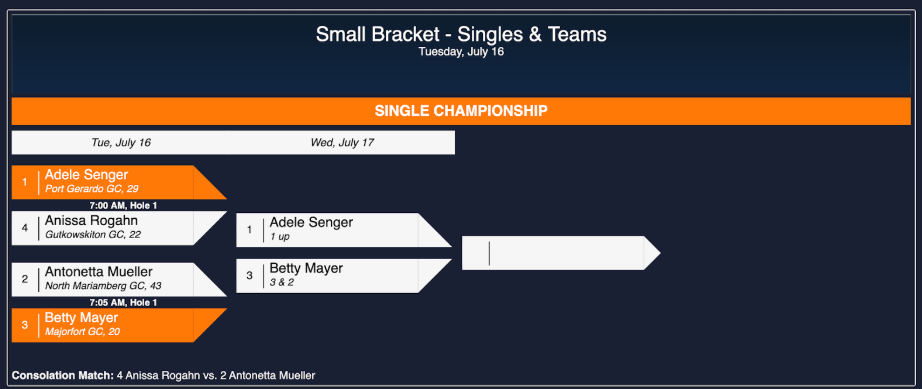
The low handicap team is playing the high handicap team in the first match (seed 1 vs. seed 8), and so on. Only after the March 24 round can the matches for the second round be determined, scorecards printed, the bracket display be updated, etc. In the case where rounds are played weekly or less often, the system must work dynamically — as soon as a next match can be determined (that is, the two top matches on the diagram are complete), the system must be prepared for the round 2 match to be played even if neither of the bottom two matches have even been started.
Oftentimes, a bracket is preceded by a single or multi-round Stroke Play Qualifier. Consider the case of 36-hole Stroke Play with a cut list to 64 teams that are then seeded into brackets based on their cumulative 36-hole Stroke Play score. Additionally, many bracket tournaments run a "consolation bracket" formed from the players or teams that lose their first match. There can also be a final consolation match among the two players or teams that lose in the semi-final round. Lastly, the final round is often a 36 hole championship round. Bracket tournaments can be very complex to manage for the reasons stated above.
Today, clubs can rely on a sophisticated TMS because it dramatically reduces the time and effort required to set up and manage these complicated tournaments. Golf Genius TM makes it very easy to create one event that includes the qualifier rounds, creates the cut list, and then automatically seeds the first bracket round. Other TMS' require that the multi-round qualifier and the brackets be created as separate events, and this means that the organizer must determine winners from the qualifier and then create the bracket tournament with manual seeding, which is time consuming and error prone.
"Time is Money" is reality in golf operations, and an important aspect of a robust TMS is that it saves time for those setting up and managing these popular tournaments.
The Custom Tournament Builder
A TMS needs to support an endless array of tournament formats. Consider the following examples supported by Golf Genius TM, in order of increasing complexity:
- Player vs. Field
- Player vs. Field but use a player's Handicap Index instead of Playing Handicap
- Best two balls of foursome vs. field
- Best ball of team vs. field, but the team does not need to be in the same pairing group (virtual teams)
- A skins tournament of pair vs. field with carry and validation
- Best two balls of foursome vs. field, but drop each foursome's worst x holes
- Foursome vs. field, best two gross scores plus best two net scores
- College Scoring Format: for a team of 8, use the three best 18 hole gross scores and two best net scores
- Foursome vs. field, one ball on par 3s, two balls on par 4s, three balls on par 5s
- Cha Cha Cha: one ball on hole 1, two on hole 2, three on hole 3, then repeat
- Lone Ranger: on each hole, one designated player's ball plus best of other three; rotate
- Foursome vs. field, best of A and B at gross plus best of C and D at net
- Teams within teams: inter-club, twelve players in pairs playing alternate shot
- Match Play: Four Ball match plus two singles matches from same foursome
- Ringerboards: best score per hole across an entire season
- Gross/Net Bias: concurrent gross and net competitions, player wins from best finish only
- Adjustable Quota: quota adjusts after each round
- User-Scored: Closest to the Pin, Longest Drive, etc.
- Team Wheels: 6 teams per foursome from all pair combinations
- 2x2 Scramble: both pairs play scramble, then best ball of the pairs
- Many other types of tournaments
The only sure way to provide for every imaginable tournament format desired by customers is to enable a tournament organizer to build a tournament format from the "bottom up."
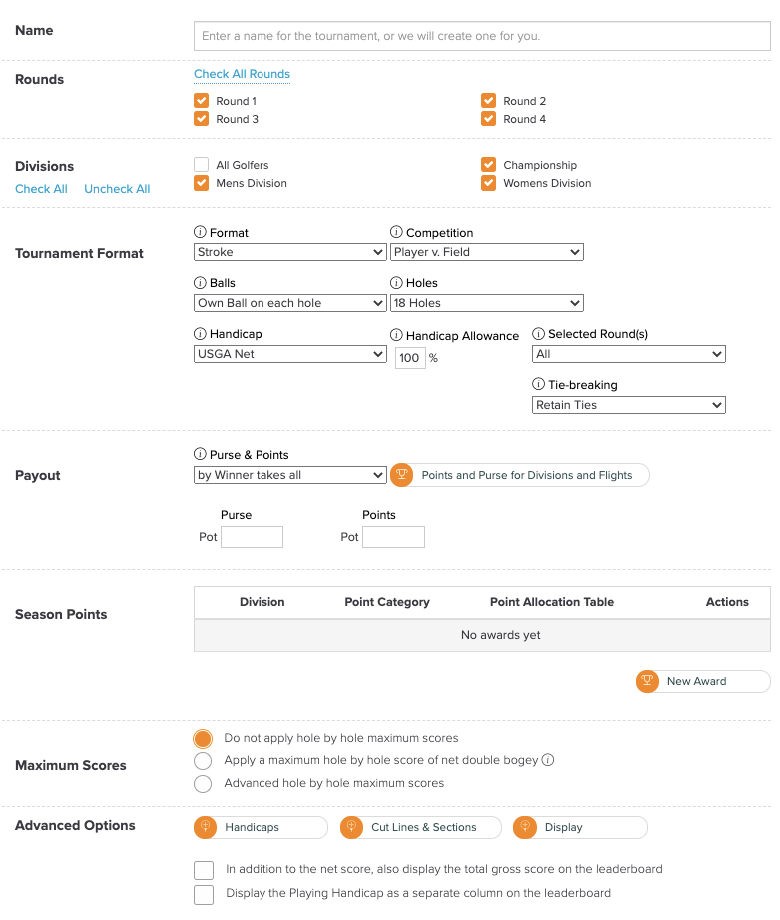
The manager builds the tournament format by selecting:
- The format (Stroke, Stableford, Quota, Match Play, Birdies, Deuces)
- The competition — who is playing whom (player vs. field, player vs. flight, foursome vs. flight or field, pair vs. flight or field, etc.)
- How many balls to count or which balls to count
- How many holes for the competition
- Handicapping and handicap allowance
- Purse and points to be earned
- Tie-breaking methods — classic countback, USGA countback, last to first hole, stroke index, tee time, or layered combinations
- Advanced options: handicaps, cutlines, leaderboard display limits, etc.
4. Handicapping
Core Handicapping Requirements
Providing the handicapping options required by clubs is a non-negotiable requirement. The TMS must calculate Playing Handicaps as per WHS Rules of Handicapping.
Integration with GHIN is an essential feature of a TMS. The TMS must be able to (1) retrieve handicap indexes from GHIN and (2) post scores to GHIN if desired by the golf staff. Since the players' GHIN number may not be known, the TMS should (3) provide a simple tool by which the TMS can query GHIN through APIs to search for a golfer by name and state, and retrieve the golfer GHIN number. Fortunately, if a venue management system is used and Golf Genius TM integration is used, the player's GHIN number will be available in the Golf Genius TM master roster. Golf Genius TM provides all three of these integration features.
It should be noted that while GHIN provides a current handicap index, the TMS must calculate the "playing handicap" based on the USGA Rules of Handicapping and the type of tournament being played, such as a mixed event alternate shot with men and women on different tees. This is obviously a bit complex, and many suppliers get it wrong or do not keep up with updates from the USGA. Even something as seemingly simple as playing off low handicap in match play is sometimes done incorrectly based on the latest USGA revisions. Golf Genius has published and regularly updates "the bible of handicap calculations," with review by the USGA: the GGS Handicapping Guide. Because Golf Genius developed and operates the GHIN system for the USGA, the company is deeply aware of the Rules of Handicapping, as evidenced in the GGS Handicapping Guide.
Advanced Handicapping Options
A TMS should also provide options that go beyond basic handicapping. Here are some examples:
- Decimal Handicaps: These are often required to avoid ties. Handicaps can be rounded to the nearest .5, tenth, or even hundredth.
- Maximum Handicaps: Many competitions apply a maximum Handicap Index or Playing Handicap.
- Handicap Allowances by Gender: Some competitions require that the Handicap Allowance applied to players be different by gender. For instance, men may have a Handicap Allowance of 90% and women may have 95%.
- Limit the Difference in Playing Handicap Between Partners: In team competitions, sometimes the difference in partner handicaps need to be limited. For instance, if a player (30 handicap) is partnered with a 2 handicap player, then one of their handicaps may need to be adjusted so the difference is reduced. There are multiple adjustment options that are possible.
- Limit the Combined Team Handicap: In team competitions, combined team handicaps may sometimes need to be limited. There are multiple ways handicaps can be adjusted to meet this limit (e.g., reduce high handicap, reduce each proportionally).
- Disallow Handicap Strokes on Par 3s: Remove all Handicap Strokes from the Par 3s. This is a common requirement for net skins tournaments.
- Handicapping the Unhandicapped: Sometimes players do not have established handicaps (a common occurrence in outings). In this scenario, Peoria Handicapping or Callaway Handicapping is used to handicap the participants who do not otherwise have handicaps.
Scramble Handicapping
Managing handicaps and providing all of the handicapping options required by clubs is essential for any TMS, and having the power and versatility to go beyond the basics is of significant value. For instance, two-person and four person scrambles are a very common and fun format in golf, and clubs have different approaches to handicapping scramble teams, all based on weighting the Handicap Indexes or Playing Handicaps of the A player, B player, etc. The USGA recommends 25% of A player's Playing Handicap plus 20% of B plus 15% of C plus 10% of D's Playing Handicap. A "Texas Scramble" is also very popular and this format uses 10% of total team handicap. To deal with all possible contingencies, Golf Genius TM allows the tournament organizer to specify the exact percentage to be applied for the A, B, C and D players.
Handicap Transparency
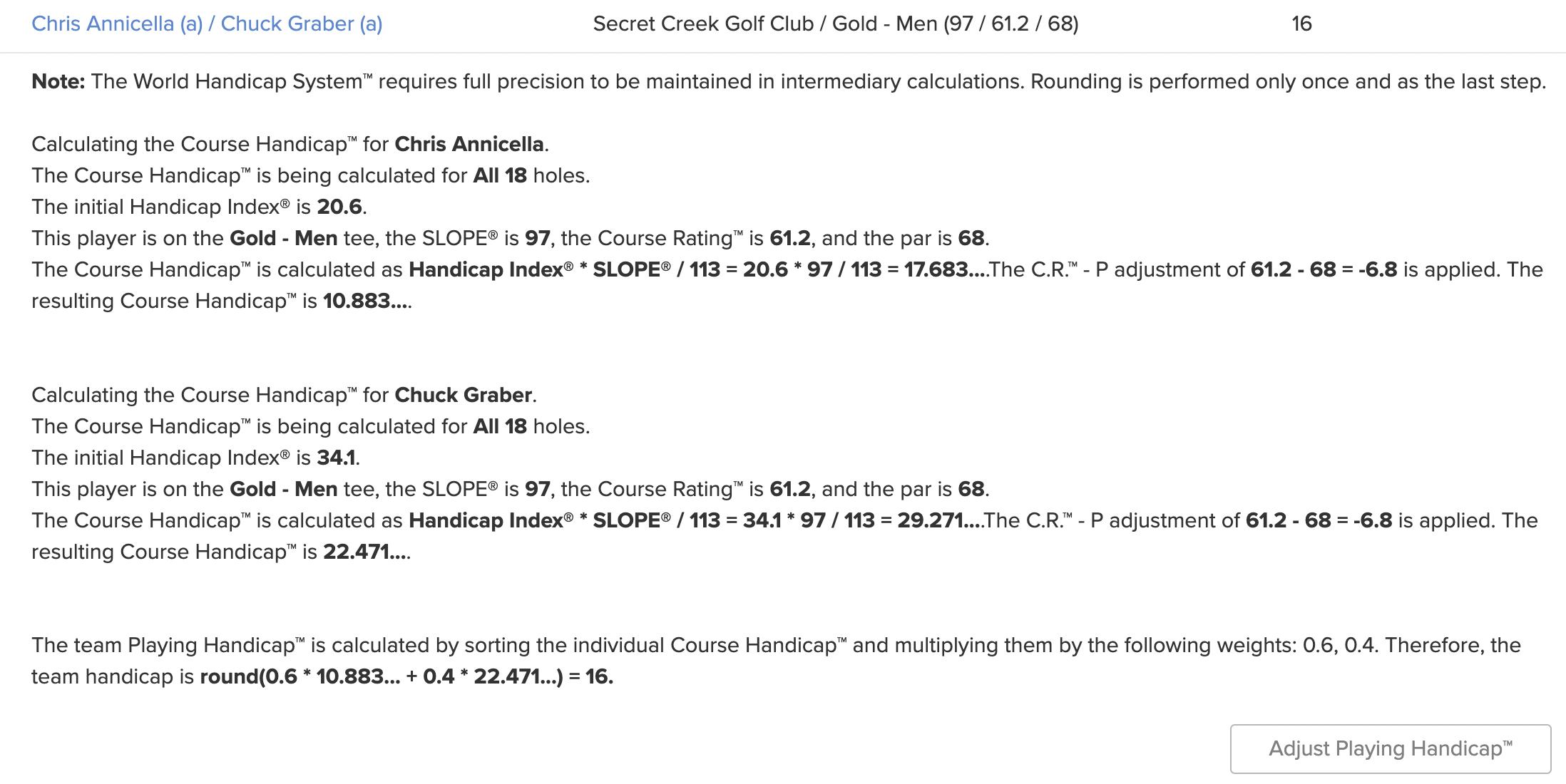
Calculating Playing Handicaps for team-based events can be complex and confusing, and leads to many questions from players when they first see handicaps on scorecards. Consider the case of an alternate shot Stableford tournament in a couples event played on multiple tees. To deal with these kinds of scenarios, a TMS needs the capability to display exactly how Playing Handicaps are calculated for each team. This capability is needed by the golf professional staff to answer sometimes heated questions about how particular handicaps were derived. Below is an illustration case of how Golf Genius TM "explains" a team handicap:
5. Tee Sheet & Scheduling
Managing the Tee Sheet
Pairing groups (number of players in a tee time) can range from two to six golfers. A TMS must be versatile enough to accommodate different size groups on tee sheets and on scorecards. Once a tee sheet is initially created, it will surely be changed. Pairing groups need to be moved around (someone always shows up late), players need to be swapped among pairings groups, there may arise a need to move from tee times to a shotgun due to a rain delay, etc. Golf Genius TM provides tools to manage all aspects of a tee sheet once it has been created.
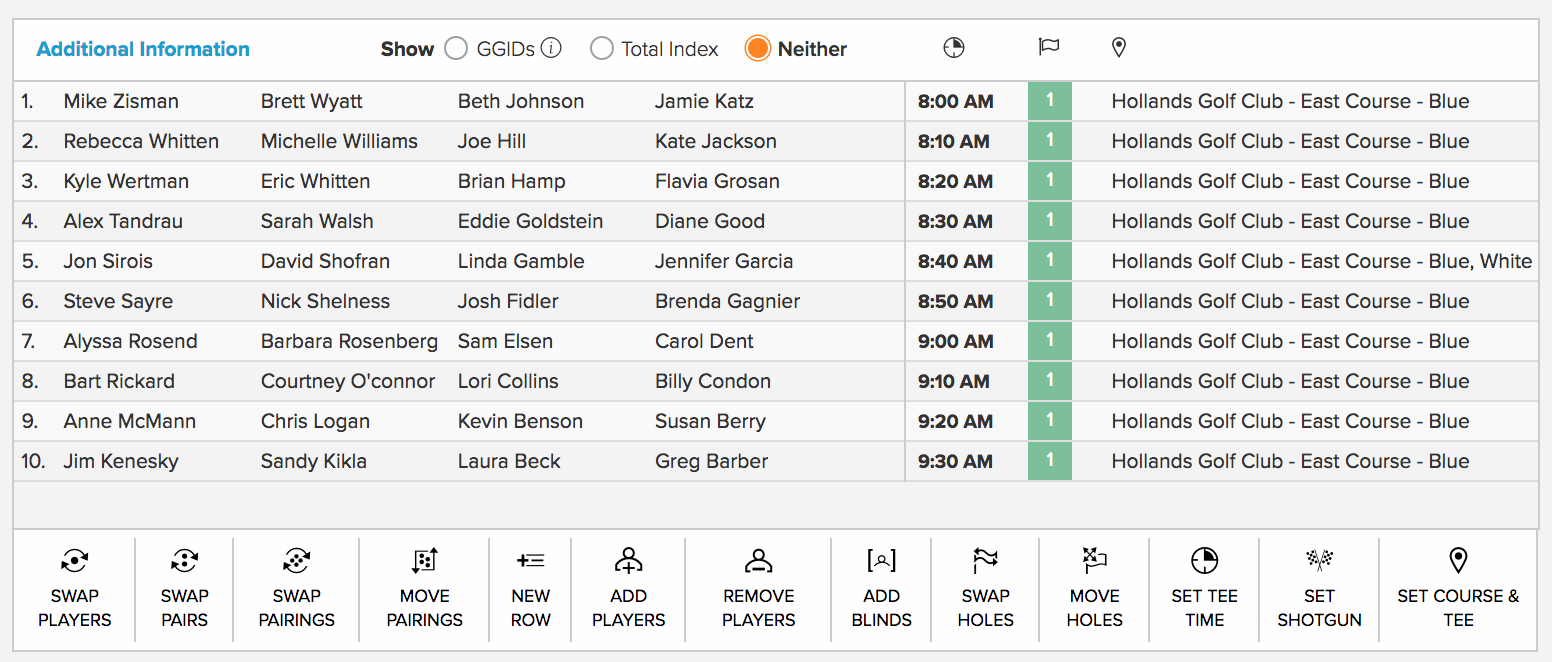
A TMS must support a tee sheet organized by tee time and be versatile enough to handle a shotgun start. For a shotgun where there will be more than one group on some holes, the organizer will usually know which holes to "double up" — oftentimes, par 5 holes. In Golf Genius TM, the default shotgun priority can be set once as part of course attributes, and/or it can be set as part of editing the tee sheet for a particular shotgun event.
Cross-9 Support
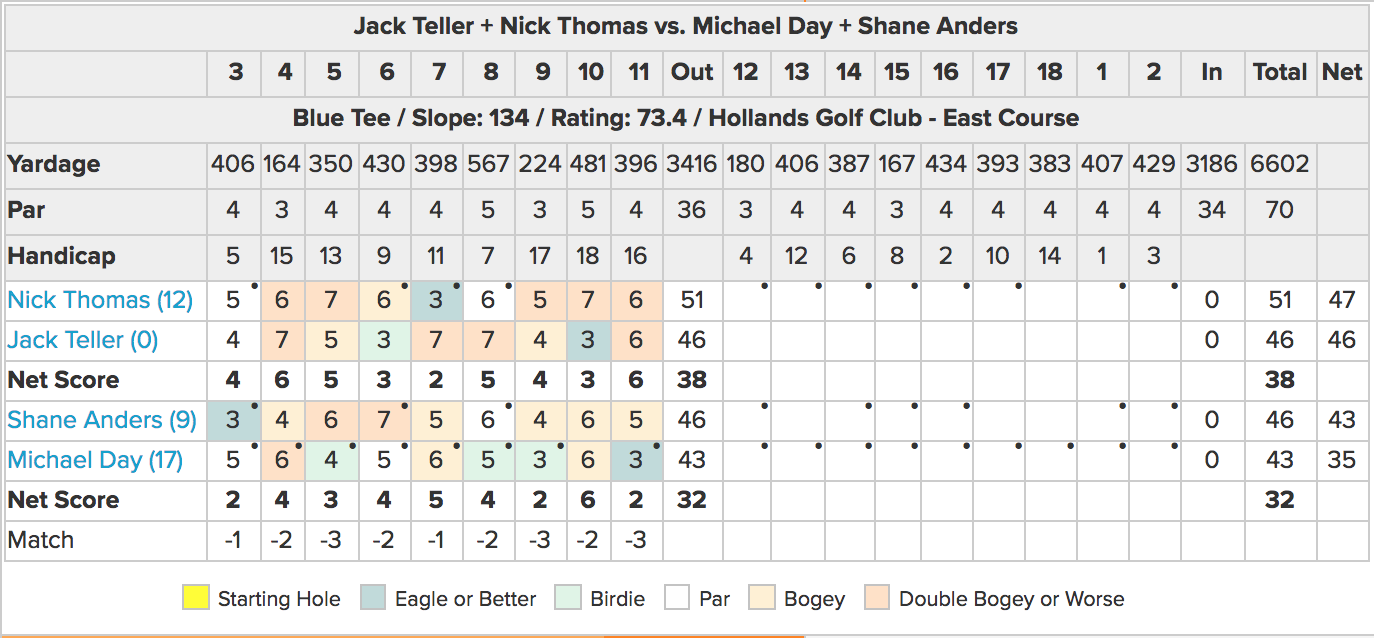
For some clubs, "Cross 9" support is very important. This is used in member-guest type tournaments where a team is playing two 9-hole matches the same day. Rather than playing front 9 and then back 9, sometimes the club will want groups to "play through," perhaps playing their first match on holes 3 to 11 and their second match on holes 12 to 2. This approach avoids the time needed to return to the clubhouse and regroup. Below is an example of a scorecard for a cross 9s match:
Automatic Scheduling
Organizing players on the tee sheet can be time consuming and challenging. Consider a few cases:
- In individual leagues, most league managers want to "mix it up" so that players are with different players over the course of the season ("minimize repeats").
- In 2-person team leagues, a team should play with all other teams the same number of times over the course of the season. Since some teams are occasional no-shows, one cannot use a simple round robin method. Tracking which teams have played with other teams so far in the league season is very time intensive. Automated scheduling solves this problem by assuring that teams play with all other teams.
- For many tournaments, managers want AB or ABCD pairings, and in such cases the total handicap for the players in the foursome should be as close to the same value as possible.
- For a Ryder Cup event, a player should have a different partner in every round and face different opponents in each round.
An automated scheduler makes the above very easy. For example, for leagues the scheduler will look at all prior rounds and build a table of who has been paired with whom how many times. It will then create pairings for the current round based on the knowledge of prior rounds with the goal, over the course of the season, of having everyone paired with everyone else about the same number of times.
As another example, consider a golf trip where eight golfers play seven rounds of golf. Ideally the trip organizer wants pairings so that every golfer is in the same foursome with every other golfer three times and is partnered (in a pair) with every other golfer exactly once.
All of the cases above are very challenging to do manually, but are trivial with an automated scheduler such as the Golf Genius Automatic Scheduler. This is a mathematical programming system that can generate and score as many as 50 million schedules per second to find the best possible pairings based on previous rounds.
6. Player, Roster & Team Management
Master Roster and Player Sourcing
Oftentimes, a club has a master roster from which players are "pulled." This master roster can be created from an uploaded spreadsheet, but more often it is sourced from GHIN or a club's membership database via daily synchronization with systems such as Foretees, Clubessential, Jonas, MembersFirst, Northstar, ForeUp, Golf Now G1, or Chrono/Lightspeed. A master roster is not necessary, and when creating a new event, the player roster can be uploaded from a spreadsheet or sourced from GHIN. However sourcing is performed, the TMS must provide an efficient way to pull players into a player roster.
For charity and corporate outings, it is almost always the case that the customer supplies a spreadsheet of player information — and at the last possible moment. Despite the guidance provided to the customer about spreadsheet format, the customer oftentimes provides a spreadsheet in a different format. A TMS that is very flexible in accepting these spreadsheets (different column names than guideline, different ordering of columns) will save a lot of time when there is little time to spare. Golf Genius TM excels in this regard.
Divisions, Flights & Teams
A field can be broken into divisions and a division can be further divided into player flights or team flights. A player or team can be in multiple divisions but only one flight within a division. It is common in a league to have divisions for seniors and super seniors, for example. A player who ages into the super senior division may choose to also compete in the seniors division. The capability for a golfer to compete in multiple divisions is a basic requirement in most leagues.
The key to efficiently managing flights is being able to create the flights automatically when possible. It is common to flight by Handicap Index, or Playing Handicap, or age, for example. When flighting by Handicap Index, the customer might want flights of the same size, or flight by Handicap Index range (0-5, 6–11, etc.). This article outlines the many methods used to create flights.
Supporting the very common requirement for optional skins requires support for divisions so that just the players participating in the skins tournament are in a division. Supporting teams is another key capability for any TMS. Teams are usually of size two, but can be of any size. Usually, teams are in the same pairing group, but Golf Genius TM fully supports virtual teams, whereby team members do not need to be in the same pairing group.
Blind Draw Teams
Blind draw teams are very common. In this case teams are created but the teams are not in the same pairing group. After the tee sheet is created, Golf Genius TM can create blind draw teams where the team players are not in the same foursome. Typically, the players do not know the composition of the teams until the round is over. This is usually a tournament in addition to the tournament created by foursome. Let's say the customer organized a best two balls of foursome, and a blind teams best two balls of foursome. Joe may be in a foursome that played poorly, only to find at lunch that his blind draw team won first place.
7. League Management
Golf leagues are fundamental to the business model of a daily fee golf course, and, while not called "leagues," also account for a substantial percentage of tournament play at private clubs (e.g., ladies 9 and 18 holers, men's and women's golf associations, couples play, Saturday men's play, "nine and dine," etc.). Without a fully capable TMS, managing leagues can be extremely time consuming for the professional staff.
League Roster vs. Round Roster
A league might have 100 members, but only 60 or so play in any given round. A TMS that services golf leagues needs to recognize this distinction and facilitate determining who is playing in each round/week. Until a round roster is confirmed, the pro shop cannot create a tee sheet, print scorecards, etc.
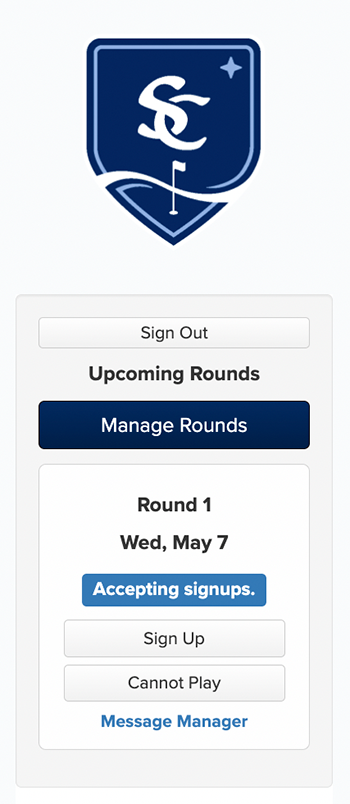
With Golf Genius TM, there are three ways to determine a round roster, and most leagues use some combination of these:
- Golf Genius TM can send an email to all players in the league roster with reply buttons for playing and not playing.
- The Golf Genius TM league portal can have a page with the league calendar, highlighting rounds that are open for signup.
- The league manager can view the league roster and confirm any player as playing or not playing for any round.
Automatic Scheduling to Minimize Repeats
Most leagues wish to have league players play with as many different people as possible over the course of the season. Even in team-based leagues (2-person teams are very common), you would like a team to be matched against as many different teams as possible. All Golf Genius TMS products provide an automatic scheduler to analyze the history of all past rounds in a league and compute a tee sheet for the round that minimizes repeats (maximizes variety), subject to rules set by the league manager.
League Manager Role
In almost every league, there is someone who wants to manage the league, which is very good news for the golf professional. In this case, the professional staff can designate this league member as a "league manager" in Golf Genius TM for a specific league. The league manager can then login to the Golf Genius TM management system with access limited to only this league. The league manager can manage all aspects of the specific league, and the staff has only to print the scorecards, cart signs and tee sheets.
Season Points
All leagues have one or more "points races," also called season points or orders of merit. There are often multiple points races in a league (seniors vs. amateur, age categories in youth golf programs, etc.). This can get complex, but comes down to scenarios like this: John is a senior playing in an event that has 100 players, and won second place. In which points race should John receive points, and how many points should be awarded? For further details, please see this article.
Substitutes
In team-based leagues, there are always rounds when one of the two team members cannot play. A substitute player ("sub") is required, and will be made part of the team for this round. The golf professional needs an easy way to add a sub before a tee sheet has been created, or, even more likely, after the tee sheet is created. In effect, a sub is a temporary member of the team.
League Portals
As with any large group, communication is the key to a smooth operation. Most leagues benefit from some sort of dedicated website to effectively communicate with league members. Without this sort of communications option, the golf shop will be inundated with calls from league members — "what's my tee time?", "what are yesterday's results?", "when do signups open for next week?" etc. Besides creating efficiencies for the pro shop, dedicated websites, or "league portals," also build engagement and add to the fun for league players.
Golf Genius TM provides the ability for the golf professional or league manager to create a website or "portal" for each event or league. The portal can contain information such as tee sheets, player rosters and leaderboards, event details, photos, results — virtually any information can be added to the portal.
8. System Integrations
Venue Management Systems
Venue management systems are usually the "system of record" at private clubs and public courses. The major suppliers of these systems to private clubs include Clubessential, Jonas, Northstar and Club Prophet. The major suppliers to public facilities are ForeUp, Lightspeed/Chrono, Tee Snap, and Golf Now. Integration with these systems such that a "master roster" can be maintained by the TMS and synchronized daily is an enormous time saver for the golf staff. With seamless system integration, a member's email address, phone number, GHIN number, gender and date of birth are updated every night. Consider gender as an example. In mixed events, men and women usually play from different tees. If the course database indicates the default tee for each gender, then players are automatically placed on the correct tee when they are added to the tee sheet. Without proper system integration, a staff member will need to manually update the tee to be played for each female participant, for example. This may be manageable with an event of 12 golfers and 6 women, but it is tedious and error prone for a field of 60 golfers that includes 30 women. Master roster synch with popular club systems should be considered a "must have" requirement for a TMS. Golf Genius TM integrates with all of the major venue management systems.
Cart Display Systems
Most courses have golf carts from Club Car, EZ-Go or Yamaha. Many clubs and public facilities order these carts with LCD displays for GPS navigation, course maps, geofencing, etc. Entering tournament scores and viewing leaderboards from the cart display is very convenient and has become a requirement for many clubs and courses. Why? As the cart leaves a completed hole, it can automatically display a touchscreen to enter scores for that hole. Leaderboards can then be displayed on the cart. Golf Genius TM supports integration with the above cart manufacturers, as well as Tag Marshall, Fairway IQ and other independent cart display providers.
GHIN and Handicap Authorities
Integration with GHIN is an essential feature of a TMS. The TMS must be able to (1) retrieve handicap indexes from GHIN and (2) post scores to GHIN if desired by the golf staff. Since the players' GHIN number may not be known, the TMS should (3) provide a simple tool by which the TMS can query GHIN through APIs to search for a golfer by name and state, and retrieve the golfer GHIN number. Golf Genius TM provides all three of these integration features.
USGA Course Rating Directory
Course details can be accessed automatically from the USGA Course Rating Directory or added manually. For each tee, the TMS needs hole-by-hole yardage, par, Stroke Index, and shotgun hole priority. Optionally, the system should store default tee by gender, and pace of play time for each hole (including transition time from hole to hole). With Golf Genius TM, basic course information can be retrieved automatically from the GHIN Course Rating Directory (CRD). With that as a base, attributes such as shotgun hole priority and default tee by gender can be added.
9. Communication, Portals & Branding
Event and League Portals
An important and valuable benefit for both golfers and professional staff is to minimize the need for repeated contact with the golf shop with questions concerning a club event or tournament. Before an event, participants make frequent shop calls with starting time and pairings questions. After an event, shops often get deluged with calls inquiring about final results. These calls interrupt everyday staff activities, and, in aggregate, have an impact on productivity. The way to minimize inbound questions is to maximize availability of information and make access to this information fast and easy. While it is important to have a means to communicate personally with golfers, a TMS must also provide powerful tools for the professional staff to more efficiently manage a busy calendar of golf events.
To meet these dual requirements, Golf Genius TM provides a management interface for golf professionals with the ability to easily create and deploy custom online event "portals" for access by event participants. The management interface is used by the professional staff to create events, load players into events, create tee sheets and tournaments, enter scores, etc.
Importantly, for each event or league, the golf professional can easily create a custom portal (which looks and acts like a website) with complete control over what information is presented and how it is organized. A rich event portal can display tournament information such as tee sheets, daily results and live leaderboards, as well as other content such as photos of the action on the course, off-course event information such as dining details and any other information provided by the golf staff that would be helpful to event participants.
Email, Text Messaging & Notifications
Besides offering attractive, engaging portals as a mode of communication, a TMS should provide for easy one-to-one or one-to-many communication with golfers, with options for email, text messaging and notifications. These integrated communication tools are used heavily by a golf staff. Different modes of communication have different advantages. Email and text messaging are great for short communications (e.g., a rain delay) but a portal is desirable for displaying an unlimited range of information (text, videos, photos, course information, event details, season points for a league or season statistics for golfers, etc.) Note that some TMS suppliers pass along a text messaging charge to customers.
Sponsor Branding
An advanced TMS will ensure heightened value for sponsors by providing branding and messaging "real estate" on scorecards, cart signs and TV leaderboards. For example, offering sponsors the opportunity to place logos on cart signs, scorecards, and leaderboards may create an "upcharge" opportunity for the club to maximize sponsor revenue.
For charity and corporate outings in particular, sponsor visibility is directly tied to revenue. A TMS that offers branding placements across scorecards, cart signs, TV leaderboards, portal pages, and mobile app screens gives the outing organizer a compelling value proposition for sponsors around brand exposure. With Golf Genius TM, sponsors can have their logos displayed on every printed and digital touchpoint throughout the event — from the cart sign a player sees at the first tee to the live leaderboard on the clubhouse TV. This breadth and depth of placement helps facilities command higher sponsorship fees and encourages sponsors to return year after year.
10. Printed Materials & Reports
The very basic printed materials required for a busy golf calendar are tee sheets, scorecards and cart signs. However, most Customers have event requirements that go far beyond basic printed materials.
Scorecards
In the case of scorecards, customers need complete control of what is printed in the header and footer of the card (above and below the actual scoring lines); whether or not there is a marker notes area and if so, placement on top or bottom of scorecard; what sort of watermark is used; where logos are placed, and font, color and size for all printed elements of the scorecard. The Scorecard Composer can be used to control every element of the scorecard, or the customer can select from a very wide range of existing scorecards.
Cart Signs
In the case of cart signs, customers often wish to place multiple logos on the cart sign for outing sponsors, and want total control of how the cart sign looks. For member-guest invitational events, they'll also need the starting times and starting holes listed for all event matches.
Tee Sheets
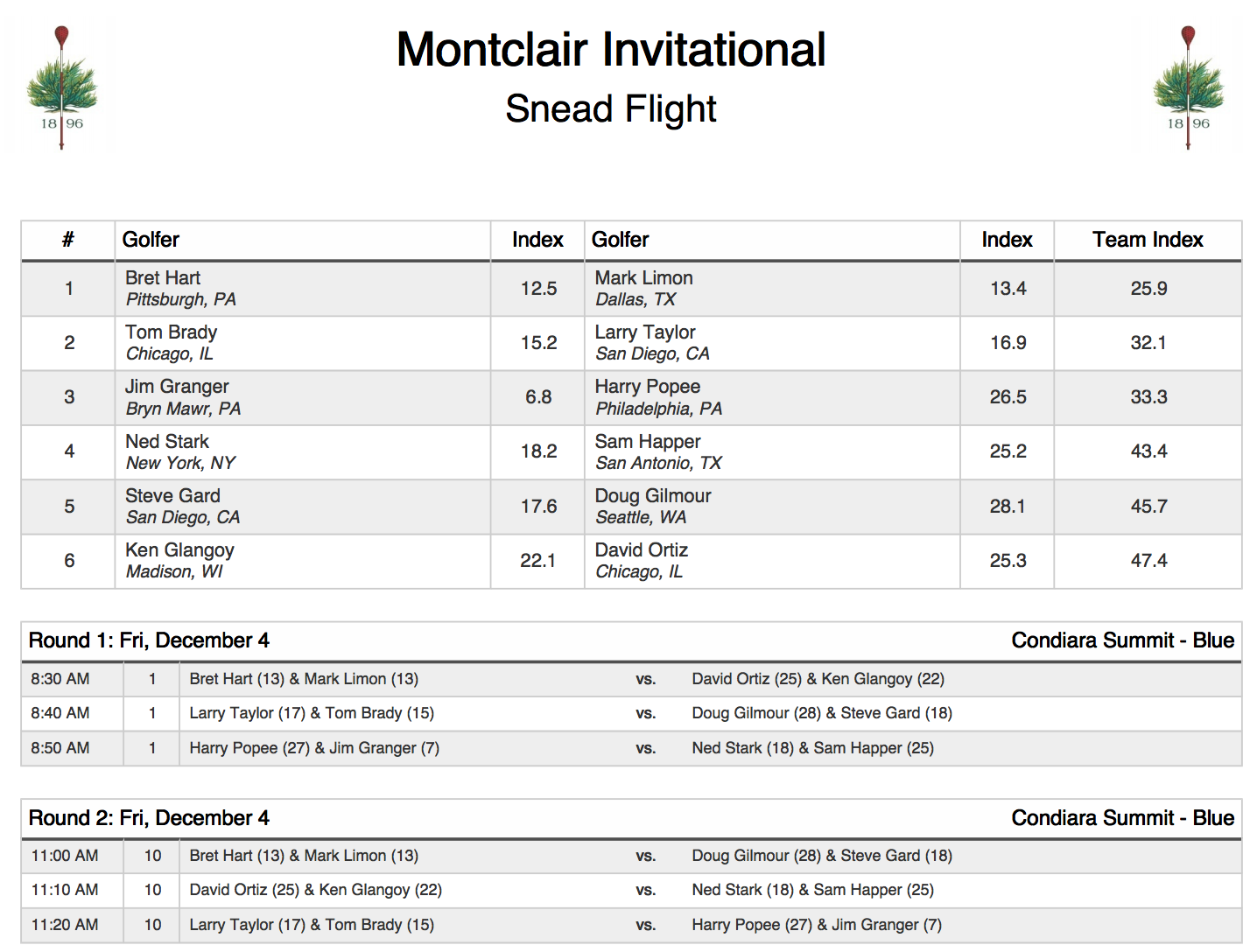
For tee sheets, there are numerous requirements. Some customers want to produce a document organized by tee times at the top and by alpha at the bottom. Round robin tee sheets are a common requirement.
Report Composers and Template Library
To meet the various needs of customers, Golf Genius TM provides a Report Composer, a Page Composer, a Spreadsheet Composer and a Scorecard Composer. There is a very comprehensive library of material created and widely shared by the Golf Genius TM community. Users can easily select, edit and print items that have been created by others and contributed to the library.
2026 Printed Materials Overview11. Registration & Payments
Configurable Registration Rules
Many TMS' provide an ability for golfers to register for events, and possibly to pay the registration fee. Some of these registration tools are very simple (a link to a simple registration page) and some like the registration options in Golf Genius TM are very comprehensive. To illustrate by way of a small example, the registration process for a private club member/guest might require that a member include one guest or three guests, but not two guests. The TMS registration system must be able to handle infrequent use cases.
Payment Collection
If payments are supported, then the TMS needs a means to get payment information from multiple golfers. For example, if player A also wishes to register players B, C and D, the TMS should have the capability to email players B, C, and D providing them with a link to provide their payment details.
Tee Gift and Merchandise Orders
Tee Gifts are very popular for Member Guest Events. This process traditionally requires manually collecting sizes, tracking selections, and sometimes time consuming back-and-forth communication before the event. With Golf Genius TM, you can easily create a custom order form, connect it to your event roster, and collect the gift orders from your event participants.
Roster Transfer
Sometimes a golf club will want to use its venue management registration system for events ("we want golfers using one registration system for recreational golf, dining and golf events"). In this case, it's important that the venue management integration provides for transfer of the event rosters (sometimes with tee time determined) from the venue management system to the TMS. Likewise, if registration is done on the TMS, then the TMS should be capable of transferring the event roster back to the venue management system.
12. Support, Reliability & Operations
Activity Logging
It is very important to log all activity by staff and by golfers, and make these logs available and searchable to Customer golf professionals. Consider a simple case where a golfer registers to play in a league round but then cancels his registration. When the golfer later questions why he "is not on the roster" for the round, an activity log can be easily referenced to "remind" the golfer the specific date and time he in fact cancelled his registration. This is one simple example of the wide range of activities that need to be logged. Most TMS do not provide any form of activity logging, and this deficiency can place the golf staff in an awkward position when trying to assist their golfers. There are good reasons why enterprise level IT systems always provide robust activity logging. A TMS should be no exception.
Customer Support
Quality and timeliness of customer support is clearly a critically important aspect of a "complete product." How does a supplier provide customer support? Are there multiple and redundant support channels, available experts, email, chat, knowledge base access, and phone support? Is the support staff available 7 x 24? How large and well-trained is the support staff? Are there PGA Professionals on the support staff?
Golf Genius provides multi-channel customer support via live chat, email, phone, and an extensive self-service knowledge base (see below). The support team includes PGA Professionals who understand the operational context in which the software is used — they have managed tournaments themselves and can speak the language of golf operations. Support is available seven days a week, with extended hours during peak tournament season. At Golf Genius, response times and resolution rates are monitored internally to ensure that tournament day support is exceeding customer expectations.
Knowledge Base
Successful system suppliers support customers with a robust, constantly updated knowledge base of "how to" articles, including comprehensive video guides that customers find extremely helpful. The quality of any TMS knowledge base should be carefully reviewed to determine how useful it is in a mission critical environment wherein customers need answers fast. The Golf Genius Knowledge Base has over 1,200 articles and an unusually high 85% "deflection rate." Successful deflection means that when a Golf Genius TM customer clicks on "Help," his or her question is answered using the knowledge base 85% of the time, meaning in only 15% of cases does the customer require further support by "clicking through" to connect with a support rep.
Course Detail Management
With Golf Genius TM, course details can be accessed automatically from the USGA Course Rating Directory or added manually. For each tee, the TMS needs hole-by-hole yardage, par, Stroke Index, and shotgun hole priority. Optionally, the system should store default tee by gender, and pace of play time for each hole (including transition time from hole to hole). With Golf Genius TM basic course information can be retrieved automatically from the GHIN Course Rating Directory (CRD). With that as a base, attributes such as shotgun hole priority and default tee by gender can be added.
13. Golf Genius TM by the Numbers
There are many capabilities described above, but what do clubs actually do? To answer this question, it's useful to examine statistics from use of the Golf Genius TM in 2025. Golf Genius has just over 11,000 clubs as customers in 62 countries.
| Metric | 2025 Value |
|---|---|
| Total club events managed | 530,930 |
| Single round events | 410,243 (77%) |
| Multi-round events | 120,687 (23%) |
| Single round equivalents | 1,478,552 |
| Total rounds of golf played | 41,053,698 |
| Leagues managed | 29,717 (40% of single round equivalents) |
| Leagues with designated league managers | 10,000+ |
| Round robin events | 6,349 |
| Ryder Cup events | 7,523 |
| Bracket rounds | 11,988 |
| Multi-round multi-format events | 5,699 |
| Events on multiple courses | 5,254 |
| 3/3/3 or 6/6/6 tournaments | 42,876 |
| 9/9 events | 37,175 |
| Peak day (June 7) | 5,542 events / 289,985 rounds |
A "club event" is a single round event or a multi-round event such as a 5 round member/guest tournament. A 5 round club event has five single round equivalents. The math illustrates that in 2025 Golf Genius TM managed about 1.5 million single round equivalents — an average of about 4,000 events per day, 365 days per year. Across all of these events, there were 41 million golfer rounds.
Golf Genius TM also supported nearly 30,000 golf leagues in 2025. This number clearly demonstrates how important golf leagues are to the golf ecosystem for both private clubs and public facilities — and why it is so important that a TMS have deep, comprehensive support for golf leagues. For over 10,000 of these leagues, the club professional appointed someone in the league to be the league manager, giving this individual full access to Golf Genius TM for a specific league.
These numbers underscore two key themes. First, the sheer volume of events and rounds confirms that a TMS is mission-critical infrastructure and not a discretionary tool — on the busiest day of the year, roughly half of all Golf Genius TM customers had an active event. Second, the variety of event types, especially the tens of thousands of multi-round events, brackets, round robins, and Ryder Cups, illustrates why a TMS must be battle-tested at scale. A system that handles only simple events leaves golf professionals unsupported precisely when they need help most: during the complex, high-visibility tournaments that define the member experience. Comprehensive features and functions and outstanding customer support are the hallmarks of a TMS you can rely on.
© Golf Genius Software